Web Developer Help
Requirements
The Web Developer extension adds various web developer tools to a browser. The extension is available for Chrome, Firefox and Opera, and will run on any platform that these browsers support including Windows, OS X and Linux.
Uninstall
The extension can be uninstalled using the built-in uninstall functionality provided by the browser. Please read the help for Chrome or Firefox.
FAQ
Chrome
Why does the extension need access to all my browsing history and private data?
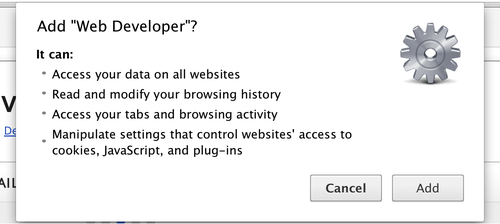
The above message is shown when installing the extension in Chrome. It is a standard message shown by Chrome that indicates that the extension has full access to all the user's data on all web sites in order for all of its features to work. None of this data is accessed beyond the needs of the features of the extension and no personal data is sent from the extension to a third-party apart from for the third-party features such as validators.
Why does version 0.4 of the extension require extra permissions?
Some of the new features like 'Disable JavaScript' and the new cookie features that were added in version 0.4 of the extension require extra permissions. None of this data is accessed beyond the needs of the features of the extension and no personal data is sent from the extension to a third-party apart from for the third-party features such as validators.
Why did the extension allow notifications on all sites?
This was an issue with how the extension used the Chrome APIs for the disable features.
Why are cookies not able to be added or edited on the localhost domain?
The current Chrome APIs do not allow cookies to be added to or edited on the localhost domain.
Firefox
Why does version 2.0 of the extension no longer display as a toolbar?
Firefox 57+ no longer allows extensions to create toolbars so the extension now has to be activated by clicking on the cog icon in the toolbar. The toolbar may need to be customized to add the icon.
Why does version 2.0 of the extension no longer have any disable features?
Firefox removed the APIs that powered the disable features so these features had to be removed from the extension. I have asked Firefox to add support for these APIs back in, but until they do so there is nothing I can do on my end unfortunately.
Why does version 2.0 of the extension no longer have the 'Display Style Information' feature?
The ‘Display Style Information’ feature had to be removed as Firefox removed the APIs that it was using. The best replacement for this feature is the CSS inspector built into the browser developer tools.
Why does version 2.0 of the extension no longer appear under the right-click context menu?
Firefox 57+ limits what extensions can do with the context menu and does not support a nested menu structure that the extension requires.
Why is the extension no longer localized for my language?
The localizations need to be re-written for version 2.0+ and I plan to add them back in for a future release.
Why does feature 'X' not work in a nightly, alpha, beta or release candidate browser build?
Nightly, alpha, beta and release candidate browser builds are not supported. If you see the same problem with a milestone build then please send me an email.
Common
Why does the extension not work on the Chrome Extension Gallery or Firefox Add-ons site?
No Chrome extensions are allowed to run on the Chrome Extension Gallery or Firefox extensions on the Firefox Add-ons site for security reasons.
Will you add a new resize dimension or tool to the defaults?
No. The extension allows the user to configure the list of resize dimensions and tools. The defaults are provided purely as examples.
When will the next version of the extension be released?
I only work on the extension in my free time so it is not possible for me to guarantee any release date for future versions of the extension.
What should I do if my question is not covered here?
Please send me an email.